
Whether you’re on console or PC, using a controller in Call of Duty: Black Ops 7 can give you the ultimate edge. Easy to pick up, yet highly customizable, controllers allow for precise movement, faster reaction times, and smoother gameplay. To dominate the battlefield, having the right controller settings is essential — and that’s exactly what this guide delivers.
Why Controller Settings Matter
Black Ops 7 isn’t just about reflexes; it’s about control. The way your stick sensitivity, aim assist, movement, and combat behaviors are set can make the difference between winning a firefight or getting taken down. Optimized controller settings help you:
Move fluidly across maps
Aim with pinpoint accuracy
Execute complex maneuvers like slides, mantles, and combat rolls
Reduce hand fatigue for longer, more comfortable gaming sessions
These settings have been tested by community veterans such as Scrap, WhoIsImmortal, Zyro, and LunchTime, taking thousands of hours of gameplay into account. You can trust these adjustments to give you performance and comfort without compromise.
How to Update Your Controller Settings
Pause your game from the main menu or during a match.
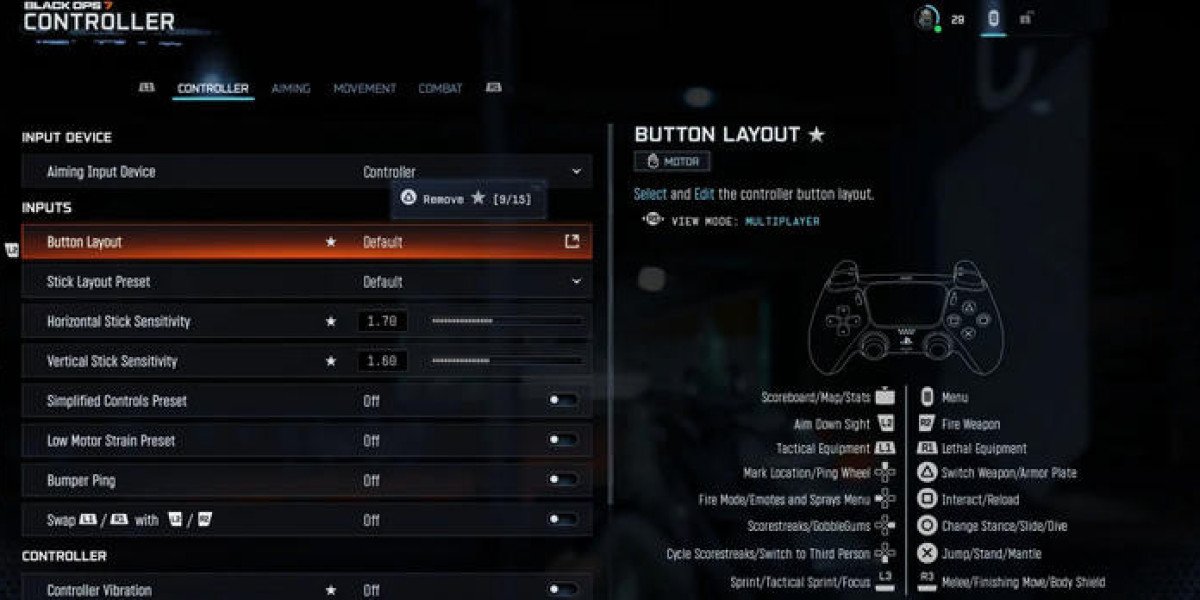
Navigate to the gear icon and select Controller.
Test your new settings in the Firing Range or a live match.
Adjust gradually — small tweaks make all the difference.
Recommended Controller Settings for Black Ops 7
Sensitivity & Stick Settings
Horizontal & Vertical Stick Sensitivity: 1.60–1.70
Look Inversion: Standard (Inverted for Air/Wingsuit)
Aim Assist: On
Dynamic Aim Response Curve for smooth and reactive aiming
Movement & Combat
Sprint Assist: On
Corner Slice: On
Combat Roll Assist: Medium
Slide/Dive Behavior: Hybrid
Tactical Sprint Activation: Single Tap
Weapon Mount & ADS Behavior: Hold for precise control
Deadzone & Advanced Settings
Left Stick Max: 60–70
Right Stick Min: 2–5
Custom Sensitivity Per Zoom: On
ADS Sense Multipliers: Optimized for low and high zoom weapons
Controller Vibration & Trigger Effect: Off (reduce hand strain)
Overlay & Utility
Scoreboard/Map/Stats Behavior: Hold
Inventory Control: Directional Buttons
Ping Wheel Delay & Double Tap Danger Ping: Short for fast communication
Why These Settings Work
These controller settings are designed to maximize comfort, minimize strain, and give players control at any range. From close-quarters combat to long-range sniping, your performance becomes more consistent, predictable, and deadly.
By combining optimized sensitivity, intuitive movement, and aim assist tuning, these settings turn your controller into a precision tool capable of outperforming even the most skilled opponents.
Ready to Dominate?
Plug in your controller, tweak your settings, and step onto the battlefield with confidence. With these Black Ops 7 controller settings, you’re not just playing — you’re commanding the game. Every sprint, slide, and headshot counts, so make them all hit.
For more info, please feel free to browse U4GM! This is also the best place to buy CoD BO7 Bot Lobbies that can help you easily rack up high kill counts (often 150-300+ per game), complete challenges, unlock camos (like Gold, Diamond, or Dark Matter), max out weapon levels, boost K/D ratios, and farm XP or achievements.